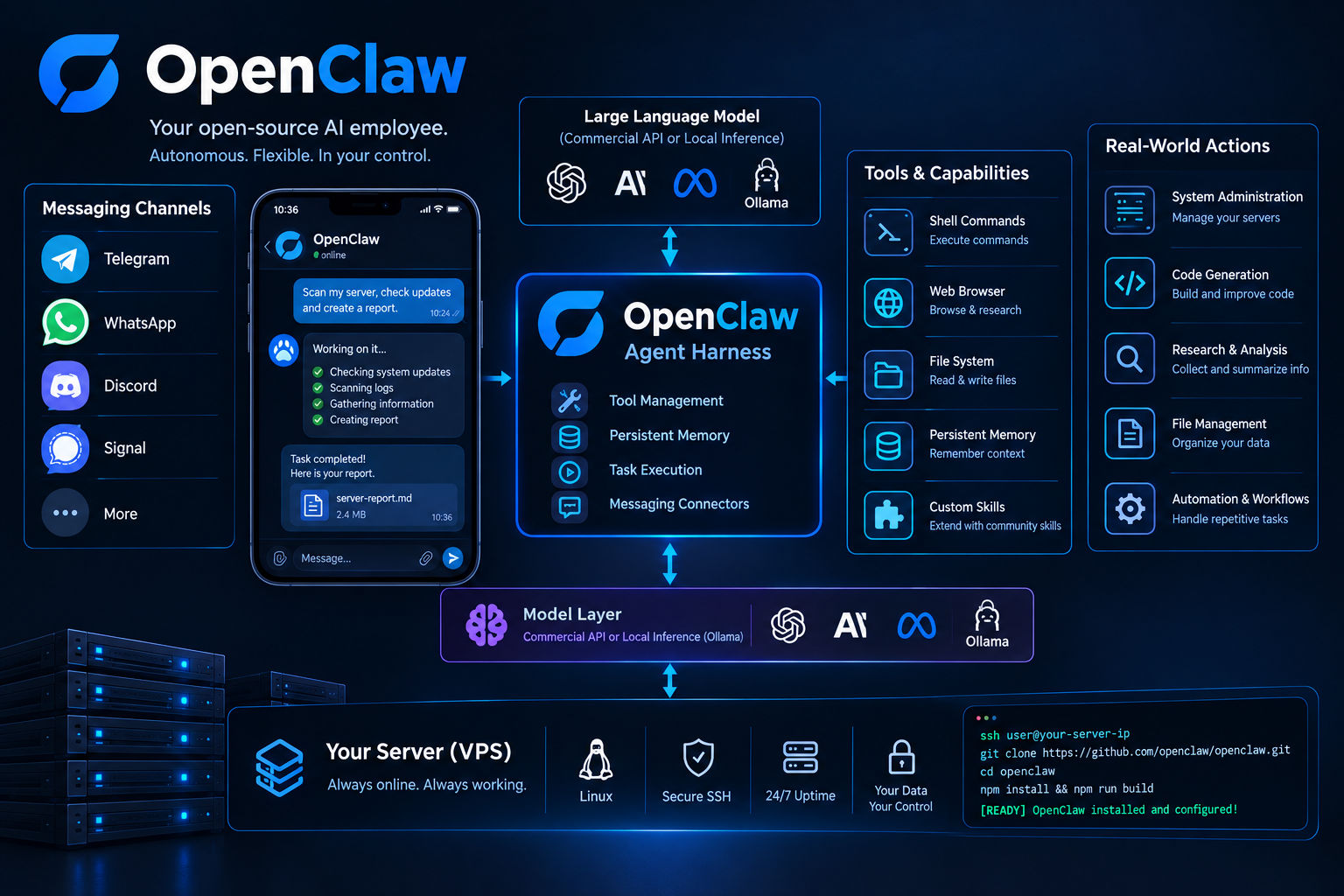
How to build a fully functional AI employee
You can build a fully functional AI employee by deploying OpenClaw, an open-source autonomous agent platform that connects large language models to local filesystem tools, persistent memory, and messaging channels such as WhatsApp and Telegram. Unlike static chat interfaces that require you to manually provide a prompt for every task, OpenClaw is designed to operate continuously on your own infrastructure. This allows the agent to execute shell commands, browse the web, manage files, remember previous interactions, and complete multi-step workflows while you are away from your computer.
With the right configuration, an autonomous agent can take on repetitive technical and administrative responsibilities, such as collecting information, organizing files, running scripts, generating code, monitoring systems, or interacting with connected services. The important difference is that the agent is not simply responding to individual questions. It can act as a persistent software worker that remains available through a messaging interface and performs actions using the tools you make accessible to it.
The Architecture: Intelligence Meets Execution
The core breakthrough of an AI employee lies in separating the reasoning engine from the agent harness. The model serves as the brain, processing logic through commercial API endpoints or local inference servers such as Ollama, while OpenClaw acts as the operating layer that provides tools, persistent memory, task execution, and messaging connectors.
This architecture makes it possible to change the underlying model without completely rebuilding the automation environment around it. Instead of tying your workflows to a single AI provider, the agent harness can serve as the layer responsible for connecting intelligence with real-world actions. This separation is particularly useful for organizations that want to experiment with different models, local inference, or specialized systems while keeping their existing automation workflows intact.
You can review the official codebase, community-driven skills, and contribution guidelines directly on the official OpenClaw GitHub Repository. By connecting this harness to channels such as Telegram, Discord, or Signal, you can message your server from your smartphone and trigger complex technical automations, web research tasks, code-related operations, and file management jobs without needing to open a browser or manually access the server every time.
For example, a simple message could instruct the agent to inspect a project directory, gather relevant information from the web, prepare a report, and save the resulting files in a designated location. The agent can then use the available tools to work through each stage of the workflow instead of requiring you to manually perform every individual action.
How do I install and configure OpenClaw on a server?
Running your agent on a dedicated Virtual Private Server (VPS) ensures that it can remain online continuously without depending on your local computer's uptime, power state, or home network connection. A server-based deployment is especially useful when your AI employee is expected to respond to requests at any time or perform scheduled and long-running tasks.
To set up your environment, connect to your Linux server through secure SSH and execute the deployment steps.
Bash
# Connect to your remote VPS via SSH
ssh user@your-server-ip

# Clone the official OpenClaw repository and install required modules
git clone https://github.com/openclaw/openclaw.git
cd openclaw
npm install && npm run build
Console Output:
Plaintext
[INFO] Cloning OpenClaw agent harness source... [OK]
[INFO] Resolving runtime dependencies and compiling modules... [OK]
[INFO] Initializing secure communication bus and session memory... [READY]
Once the software has been installed, running the interactive configuration wizard will allow you to define the environment in which your agent operates. Depending on your deployment, the configuration process can include selecting the underlying model provider, defining token or usage limits, setting up authentication, and connecting your preferred messaging interface.
You should also decide which tools the agent actually needs before making the system available. A research assistant may only need web access and the ability to create documents, while a server-management agent may require much broader access to shell commands and system resources. Starting with the minimum set of permissions makes it easier to evaluate the system safely and expand its capabilities later.
Why does self-hosting an AI agent matter?
Self-hosting your AI employee gives you significantly greater control over your data, local filesystem, application environment, and stored credentials. Instead of sending every workflow through a hosted automation platform, the agent can run within infrastructure that you control. This can be particularly valuable when workflows involve internal source code, private documents, infrastructure information, or other sensitive operational data.
At the same time, giving an autonomous agent access to shell execution, filesystem operations, browser automation, or credentials introduces substantial security risks if the environment is left unmonitored. An AI system that can make changes to a server is fundamentally different from a chatbot that only produces text. A mistaken command, overly broad permission, or compromised integration could potentially affect the surrounding environment.
To safeguard your infrastructure while retaining maximum productivity, you should adhere strictly to the principle of least privilege:
- Isolate Environments: Always run the agent on a dedicated VPS or containerized sandbox environment rather than your primary workstation. Isolation reduces the potential impact of incorrect commands, unexpected behavior, or compromised components.
- Restrict Permissions: Limit the agent's filesystem write scope strictly to designated project directories and only provide access to the commands and services required for its tasks. This helps prevent accidental modifications to critical operating-system files or unrelated projects.
- Monitor Activity: Enable command logging, authentication controls, and session hooks wherever possible to maintain a transparent audit trail of shell executions, file modifications, and other important actions performed by the agent.
A secure deployment should also treat API keys, SSH credentials, environment variables, and messaging tokens as sensitive assets. They should not be exposed unnecessarily to the model or stored in locations where unrelated processes can access them. Regularly reviewing logs and permissions is equally important as the number of connected tools and integrations grows.
Scaling Your Autonomous Infrastructure
Deploying an autonomous AI agent can transform how you handle technical research, code generation, documentation, repetitive administration, and server-related tasks. Once the basic system is working, you can expand it by adding additional skills, integrations, specialized models, and automated workflows tailored to the specific responsibilities you want the agent to handle.
However, scaling an autonomous system introduces challenges of its own. Secure network boundaries, robust sandboxing, credential management, monitoring, reliable webhook integrations, and clearly defined permissions all become increasingly important as the agent gains access to more systems and performs more complex operations.
For teams using AI agents in production, treating the deployment as infrastructure rather than simply another chatbot can make a major difference. The agent should have clearly defined responsibilities, controlled access to resources, and an observable execution environment. This approach makes it easier to troubleshoot failures, identify unexpected behavior, and safely expand automation over time.
If you want to implement high-performance automation infrastructure tailored to your enterprise, explore our professional deployment solutions at https://services.sysalbania.com/. For teams requiring strict threat modeling, penetration testing, and vulnerability assessments on existing agent setups, schedule a comprehensive audit through our security division at https://security.sysalbania.com/.