
In computer networking and cybersecurity, many people hear terms like IP, port, and protocol, but often do not fully understand what they mean or how they work together. These three elements are the basic foundation of internet communication.
To make it easy to understand:
- An IP address is like a home address that tells data where a device is located.
- A port is like a door number that tells data which service or application should receive it.
- A protocol is like a set of rules or a language that both sides agree to use when communicating.
Without these three components, computers, servers, and smartphones would not be able to communicate correctly over a network or the internet.
What is IP (Internet Protocol)
An IP (Internet Protocol) address uniquely identifies a device on a network, much like a home address allows mail to be delivered to the correct house. IPs ensure data packets know where to go on the Internet or within a local network.
Types of IP Addresses
Public IP Addresses
- Assigned by your Internet Service Provider (ISP).
- Globally unique and routable. Used to communicate over the public internet.
- Any device or server visible from the internet typically uses a public IP.
Private IP Addresses
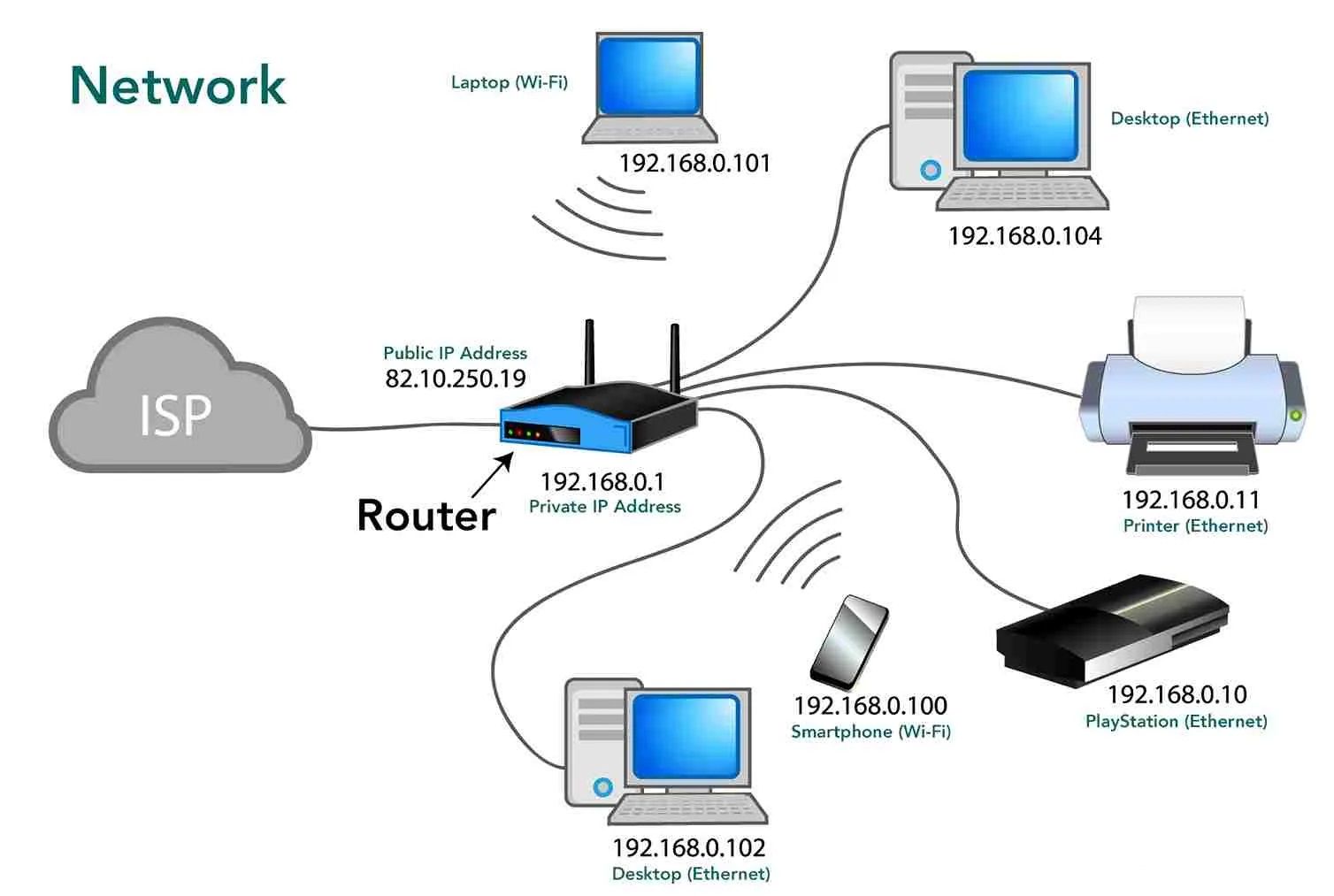
- Used inside local networks (home router, office LAN).
- Not routable on the internet directly.
- Common private ranges include:
10.0.0.0 – 10.255.255.255
172.16.0.0 – 172.31.255.255
192.168.0.0 – 192.168.255.255
IP Addresses Assignment
There are 2 methods, which are Static IP and Dynamic IP. They describe how an IP address is assigned to a device.
- Static IP
A Static IP is an IP address that does not change.
It stays the same every time the device connects to the network. The IP address is fixed, and is usually set manually or provided specifically by an ISP
A web server has this IP address:
103.25.10.5
Every day, the IP is always the same, so users can always access:
http://103.25.10.5
- Dynamic IP
A Dynamic IP is an IP address that changes over time. It is assigned automatically by a DHCP server. A DHCP server is a system (usually a router or server) that automatically assigns an IP address and gives other network settings to devices when they connect.
Today our IP is:
36.78.120.15
Tomorrow it might become:
36.78.90.221
Both IPs work together in a way that the devices inside the local network use private IPs and rely on Network Address Translation (NAT) so they can share a single public IP to access the internet. NAT translates between internal (private) and external (public) addresses.
- Your device uses a private IP
- The router translates it into a public IP
- Data is sent to the internet
- The response comes back to the router
- The router sends it to the correct private IP device
This allows many devices to share one public IP address, which saves IP addresses and improves security.
IP Versions
There are two main versions of IP addresses used today, which are:
IPv4 (Internet Protocol version 4)
- Uses 32-bit numbers
- Written as four numbers separated by dots
- Example:
192.168.1.1
This is the most commonly used version. The problem is that the number of available IPv4 addresses is limited.
IPv6 (Internet Protocol version 6)
- Uses 128-bit numbers
- Written using letters and numbers separated by colons
- Example:
2001:db8:85a3::8a2e:370:7334
This particular protocol is created to solve the IPv4 address shortage. This protocol is becoming more and more common as internet usage grows.
How To Locate Our IP
On Windows
- Open Command Prompt
2. Type
ipconfig
Ethernet Adapter. This section refers to the wired network adapter (LAN).
Media State: Media disconnected. This means the Ethernet port is not currently connected to a network cable. The cable may be unplugged, or the adapter is simply not in use.
Connection-specific DNS Suffix. This field usually contains a domain name provided by a company or organization. If it is empty, it means the network does not use a specific DNS domain.
Ethernet Adapter 2. This is another Ethernet adapter, often created by virtual machines such as VirtualBox or VMware, or by special network configurations.
Link-local IPv6 Address. This IPv6 address is automatically assigned by the system. It is only used for local network communication and cannot access the internet.
IPv4 Address. The address shown is a private IP address. IP addresses in the 192.168.x.x range are commonly used for local networks and virtual environments.
Subnet Mask. A subnet mask is a number that works together with an IP address to help devices understand which network they belong to and where to send data.
Default Gateway. This field is empty, which means this adapter does not provide internet access. It is only used for internal or local communication.
Wireless LAN Adapter — Local Area Connection. These are virtual Wi-Fi adapters created by Windows. They are commonly used for features such as Mobile hotspot, Wi-Fi Direct, and Wireless display (Miracast).
Wireless LAN Adapter — Wi-Fi. This is the main Wi-Fi adapter that is currently connected to a network and providing internet access.
Link-local IPv6 Address. This is an automatically generated IPv6 address used for local communication within the same network.
IPv4 Address. The IP address (10.x.x.x) is a private IP address. The range is often used by large networks such as companies, universities, or internet service providers.
Subnet Mask. The subnet mask (255.255.255.0) indicates that the device is part of a network with up to 254 usable host addresses.
Default Gateway. The default gateway (10.x.x.x) is the router that connects the local network to the internet. All traffic going outside the local network is sent through this address.
Bluetooth Network Adapter. This adapter allows network connections through Bluetooth. It is usually used for Bluetooth tethering and Data sharing between devices. In most cases, this adapter is inactive and rarely used.
Ports
While an IP address identifies a device, a port number identifies a specific service or application running on that device. A single device can run many services at the same time, such as a web server, email server, and database. Ports make it possible for data to reach the correct service.
Ports are numbered from 0 to 65535. Well-known ports (0–1023) are reserved for common services like:
- HTTP (port 80)
- HTTPS (port 443)
- SSH (port 22).
Registered ports (1024–49151) are assigned to specific applications, while dynamic ports (49152–65535) are used temporarily by client devices.
TCP and UDP
Ports work with two main ways of sending data, which are TCP and UDP.
TCP is careful and reliable. It makes sure all data arrives and stays in the correct order. This is used for things like websites, email, and sending files, where nothing should be missing.
UDP is faster but less careful. It does not check if data arrives correctly. This is used for videos, online games, and live calls, where speed is more important than perfect delivery.
Protocols
A protocol is a set of rules that devices follow when they communicate. It tells devices how to send data, how to receive it, and how to understand it.
For example:
- HTTP and HTTPS are rules for loading web pages
- FTP is used to send files
- SMTP is used to send emails
- DNS is used to find website IP addresses
Protocols make sure that both sides understand each other, just like people need a language to talk.