What is Hermes
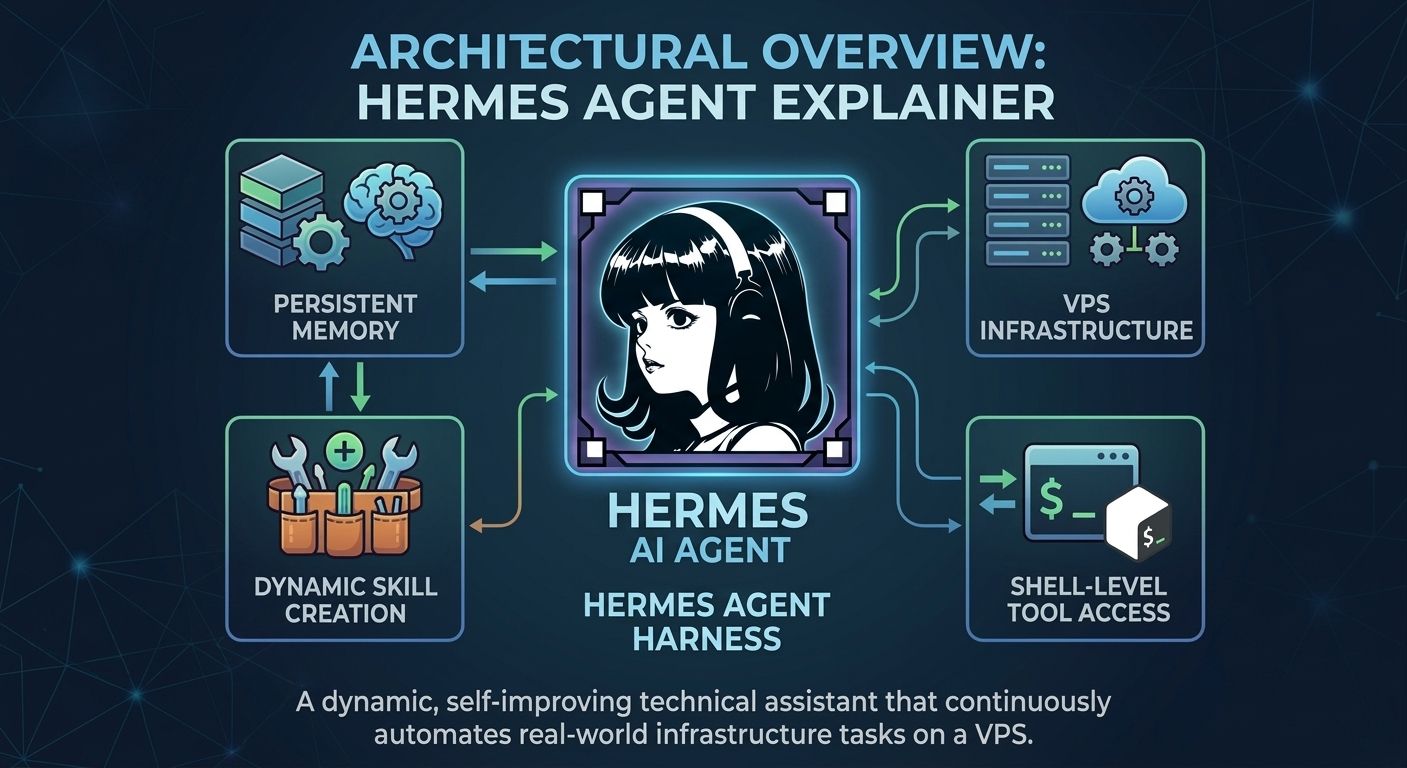
Hermes is rapidly replacing traditional AI bots like OpenClaw because it functions as an autonomous agent harness rather than a simple text generator. By wrapping a language model in an environment with persistent memory, tool execution, and dynamic skill building, Hermes becomes a digital teammate capable of resolving technical issues, running shell commands, and managing server infrastructure independently.
The Architecture: Brain vs. Harness
The fundamental distinction to understand when migrating to this system is the separation between the AI model and the agent harness. The model is simply the reasoning engine—it processes logic and language. The agent harness provides the interactive environment around that brain. Developed by Nous Research (with the official open-source repository available at https://github.com/nousresearch/hermes-agent), the harness grants the AI access to tools, memory, customized skills, messaging platforms, and local file systems.
Because of this decoupled architecture, you are never locked into a single ecosystem. You can easily connect Hermes to cloud inference providers or route it through local AI coding workflows using the official Ollama platform to run models securely right on your own hardware. This flexibility is a massive upgrade over restrictive, single-model platforms.
The Self-Improvement Loop: Memory and Skills
Memory is notoriously one of the biggest bottlenecks for traditional AI agents. Standard context windows eventually fill up, forcing older instructions and learned context to drop off entirely. Hermes solves this through persistent memory curation. Instead of archiving every single message, it extracts and preserves highly useful information, organizing it so the agent can retrieve it days or weeks later.
This memory powers the agent's standout feature: the Skill System. When Hermes encounters a difficult debugging problem, it doesn't just fix it and forget it. It runs through a continuous improvement loop: it attempts a task, encounters a problem, researches a solution, and synthesizes a new skill. Imagine your technical assistant successfully resolving a complex dependency error on your Debian server. It documents the fix, creates a reusable skill, and automatically applies that knowledge the next time a similar issue arises. Over time, your Hermes instance becomes hyper-customized to your exact infrastructure workflows.
How do I install Hermes on a VPS?
Running your agent on a Virtual Private Server (VPS) is the most practical choice for an always-available assistant. While your local laptop might go to sleep or disconnect from the network, a VPS running a stable Linux distribution remains constantly online, waiting for instructions via messaging interfaces.
To get started, spin up a Debian or Ubuntu server and establish a secure connection. Instead of exposing the agent's interface to the public internet, you should use an SSH tunnel to bind the traffic strictly to your local machine.
# Establish a secure SSH tunnel to your VPS
ssh -i ~/.ssh/vps_key -L 8080:localhost:8080 admin@your-server-ip
Once securely connected to your environment, you can pull the official harness repository and initialize the agent. Always verify the latest commands directly from the official repository before execution.
# Clone the repository and install dependencies
git clone https://github.com/NousResearch/Hermes.git
cd Hermes
npm install
npm run build

# Start the Hermes agent bound strictly to localhost
HOST=127.0.0.1 PORT=8080 npm start
Console Output:
[INFO] Initializing Hermes Agent Harness...
[INFO] Loading persistent memory core... [OK]
[INFO] Registering system tools (Shell, FS, Network)... [OK]
[INFO] Hermes listening strictly on 127.0.0.1:8080
[READY] Awaiting model connection and user input.
Why does system security matter for autonomous agents?
An autonomous AI agent equipped with shell access is incredibly powerful. If you grant it full run of your server, it has the ability to install software, modify critical configurations, and access local network resources. You must treat this agent exactly like a human user with root-level permissions. If your agent is running alongside other sensitive applications, security hardening is not optional.
Key practices include localhost binding. Never expose the agent's API or UI to the public web. Bind services strictly to localhost and access them via SSH tunnels as shown above. You should also restrict unused network protocols. If you aren't actively routing it, disabling IPv6 at the kernel level minimizes your server's attack surface. You can follow the official Debian IPv6 documentation to safely implement this restriction.
Furthermore, you must apply the Principle of Least Privilege by running the agent under a restricted, non-root user account. Utilize robust authentication protocols, such as ED25519 keys recommended by OpenSSH, and avoid leaving plaintext API keys in directories the agent frequently scans. The more autonomy you give the system, the tighter your boundary controls must be.
Security Hardening: What I'd Actually Do Before Trusting Hermes With My Server
Look, localhost binding and a non-root user are table stakes. They keep an honest agent honest, but they won't save you from a prompt-injection attack or a model that suddenly decides rm -rf looks like a reasonable cleanup step. Before I'd let Hermes anywhere near a production box, I'd go through a few extra layers of hardening — the stuff below is what I'd consider non-negotiable.
Lock down SSH like it matters — because it's your only door in. Everything reaches this server through one SSH tunnel, so that's where you spend your hardening effort first. No password logins, ED25519 keys only, root login disabled, and an AllowUsers list so only the one tunnel account even gets a chance to authenticate. Then put fail2ban on top to quietly ban the bots hammering your port all day. It takes ten minutes and closes the most obvious attack surface you have.
plain
# /etc/ssh/sshd.d/hardening.conf
PermitRootLogin no
PasswordAuthentication no
PubkeyAuthentication yes
AllowUsers tunnel-admin
Don't trust the user sandbox — add a real one on top. Even as a restricted user, the agent can still wander the filesystem and read things you'd rather it didn't. So I wrap the whole process in bubblewrap (or Firejail, or a minimal container) that shows it only its own working directories. Project folders get mounted read-only unless the agent genuinely needs to write, and temp directories get the noexec treatment so nothing dropped there can run.
plain
# Run Hermes in a sandbox that only sees what it needs
bwrap \
  --bind /home/hermes-agent /home/hermes-agent \
  --bind /srv/agent-projects /srv/agent-projects \
  --ro-bind /usr/bin /usr/bin \
  --ro-bind /usr/lib /usr/lib \
  --dev /dev --proc /proc \
  --hostname hermes-sandbox \
  env HOST=127.0.0.1 PORT=8080 npm start
Keep your secrets out of the agent's world entirely. This is the mistake I see most often: API keys sitting in plaintext config files inside directories the agent reads constantly. Don't do that. Inject credentials at launch time — systemd's LoadCredential= works beautifully — or pull from sops or Vault. Set the file permissions to 0600, rotate keys on a schedule, and if the agent ever does something weird, revoke first and ask questions later.
plain
# /etc/systemd/system/hermes.service
[Service]
User=hermes-agent
Group=hermes-agent
LoadCredential=llm_api_key:/etc/hermes/secrets/llm_api_key
Environment=HOST=127.0.0.1
Environment=PORT=8080
NoNewPrivileges=true
ProtectSystem=strict
ProtectHome=true
PrivateTmp=true
Make the agent ask before it breaks things. Honestly, this is the highest-value control for the least effort. Any command that's destructive or hard to undo — deleting files in bulk, touching the firewall, dropping tables — gets a confirmation gate. A ten-second human glance at what it's about to run prevents the overwhelming majority of "the AI deleted my stuff" horror stories you've probably already read about.
Log everything, then actually read the logs. Turn on command auditing so every shell command the agent runs gets recorded with a timestamp. Ship those logs somewhere the agent itself can't edit — a separate host, or at minimum a root-owned directory. Then set up alerts for the scary stuff: privilege escalation attempts, poking around outside its scope, unexpected network connections. Tools like auditd or syslog-ng make this straightforward, and the visibility is what separates "we caught it in minutes" from "we found out three weeks later."
plain
# Watch every command the agent user executes
auditctl -a always,exit -F arch=b64 -S execve -F auid=hermes-agent -k hermes_commands
Patch on autopilot, and always have a way back. Enable unattended security updates on the Debian/Ubuntu base — there's no reason to hand-patch kernel fixes in 2026. And before you give the agent a new capability or let it loose on a big job, take a snapshot. Every expansion of permissions should be treated like a real change: test it in the sandbox, document it, and know exactly how you'd roll it back if things go sideways.
None of this is exotic. It's the same discipline you'd apply to any daemon with root-adjacent powers — the difference is that this daemon can be talked into things by clever wording. Do all of the above, and Hermes stops being a liability waiting to happen and becomes what it's supposed to be: a genuinely useful worker you don't have to babysit.
How do I scale my AI infrastructure securely?
By combining continuous uptime on a VPS, the flexibility of local or remote models, and the ability to natively execute commands, Hermes represents a major leap forward in AI productivity. You are no longer chatting with a web interface; you are commanding a digital teammate that lives inside your infrastructure, automating tasks, and getting smarter every time it solves a problem.
Setting up this architecture requires careful planning, robust network configuration, and strict identity management. An improperly secured AI agent can easily become a massive vulnerability. If you are looking to deploy an autonomous agent environment but want to ensure it is implemented flawlessly, our team is ready to help.
- For expert assistance with setting up, optimizing, and deploying enterprise-grade infrastructure, explore our professional solutions at: https://services.sysalbania.com/
- If you have already deployed an agent or are running a custom VPS and need to ensure your environment is locked down against intrusions, schedule a comprehensive audit through our security division at: https://security.sysalbania.com/
Protect your network while fully harnessing the next generation of AI productivity.