How MCP Works: Connecting AI to Tools
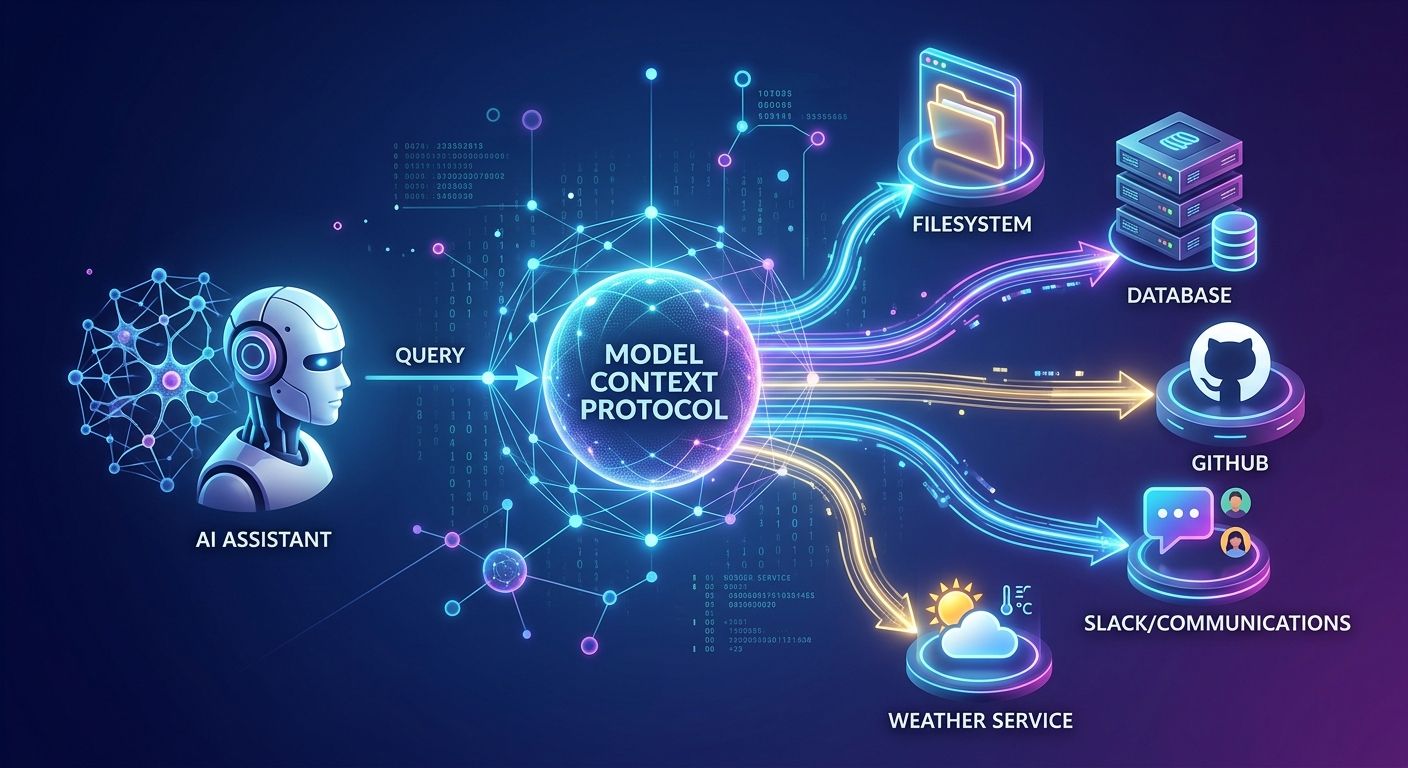
Model Context Protocol (MCP) provides a standardized way for AI applications to connect to external tools, data, and services. Instead of building numerous custom APIs, developers use MCP to let AI securely discover and interact with external systems.
As AI assistants become more advanced, they increasingly require access to live information and actions outside their base model weights. A language model cannot instantly know the current contents of a private database, nor can it automatically create a GitHub issue, unless a system provides those exact capabilities. This is exactly where MCP comes into play.
The Problem Model Context Protocol Solves
Traditionally, connecting an AI application to an external system required a custom integration. If an AI assistant needed a weather service, you built an API integration specifically for that service. Then you added separate integrations for GitHub, databases, Slack, and file systems. As tools multiply, managing these custom implementations becomes increasingly difficult.
MCP provides a standardized protocol for AI applications to communicate consistently with external capabilities. Instead of applications having to understand every individual service, they communicate through a single protocol. This modernizes development, much like the strategies discussed in our AI API Strategy Guide. The official Anthropic MCP release highlights how this standardized approach benefits the entire ecosystem.
How does the client-server architecture work?
MCP operates on a clean client-server architecture. An MCP client is the application wanting to use capabilities, such as an AI assistant or an IDE. The MCP server provides access to a specific collection of capabilities. For example, one server might access GitHub, another queries a database, and a third exposes local computer files. The client and server communicate via the standardized MCP protocol, formalizing the relationship between the AI application and its tools.
To understand the technical side, here is a standard initialization request an MCP client might send to establish a connection:
{
  "jsonrpc": "2.0",
  "method": "initialize",
  "params": {
    "protocolVersion": "2024-11-05",
    "capabilities": {
      "roots": {
        "listChanged": true
      }
    },
    "clientInfo": {
      "name": "ai-assistant-client",
      "version": "1.0.0"
    }
  },
  "id": 1
}
This JSON-RPC structure is defined by the MCP Protocol Specification, standardizing how clients declare their presence.
What capabilities do MCP servers provide?
An MCP server can expose three main types of capabilities: tools, resources, and prompts. Tools allow the AI application to perform specific actions. For instance, a server could provide a tool that searches a database or creates a GitHub issue. The AI model can discover these tools and determine which one is appropriate for the task.
Resources provide contextual information. A server might expose documents, files, or database records, allowing the AI to retrieve relevant data through the MCP connection rather than needing everything inside the initial prompt. Finally, prompts provide reusable instructions or workflows, making it possible for a server to offer useful ways to interact with capabilities. You can explore community-built servers in the GitHub MCP Servers repository.
Below is an example of an MCP client fetching a list of available tools from a server:
$ mcp-cli --server github-mcp list-tools

# Output:

# {

#   "tools": [

#     {"name": "list_issues", "description": "Fetch GitHub repository issues"},

#     {"name": "create_issue", "description": "Open a new issue in the repository"}

#   ]

# }
Why is tool discovery crucial for AI Agents?
One of the most useful aspects of MCP is discoverability. Instead of permanently hard-coding every possible tool into an AI application, the client connects to an MCP server and learns its available tools dynamically. This is vital for AI agents that work with multiple systems simultaneously.
An ordinary chatbot typically receives a prompt and generates an immediate response. An AI agent goes further: it decides it needs more information, selects a tool, calls that tool, inspects the result, and continues working. When you ask an assistant to "Find the latest issues in my GitHub repository," the client discovers the GitHub server's issue-listing tool, passes the required arguments, and the server fetches the data. The AI then uses the returned result as context for its final response.
This dynamic workflow is a core component of Building Autonomous AI Agents and functions similarly to OpenAI's Tool Calling framework.
How does MCP handle security and APIs?
It is important to understand that MCP does not simply replace traditional APIs. APIs remain extremely useful, as they define how software communicates with a particular service. However, traditional APIs are designed primarily for developers and deterministic programs. MCP defines a standardized layer that helps AI discover tools, while the underlying service still uses APIs internally (e.g., MCP server to GitHub API).
Crucially, MCP does not give an AI unlimited access to your computer or services. Access depends entirely on what the server exposes and its permissions. An MCP server granting read-only database access should not automatically be able to modify records, and a server restricted to a specific directory should not have access to the entire filesystem. Because server permissions matter significantly, reviewing the OWASP API Security Guidelines is highly recommended when configuring backend systems.
To verify that your AI server configurations securely restrict data access properly, schedule a API Security Audit with our engineering team today.