
How to Use BloodHound to Map Active Directory Attack Paths
BloodHound Community Edition (BHCE) is a graph-based security analysis platform that maps identity relationships in Active Directory so defenders can see how privileges flow from users and groups to computers, domains, and sensitive resources. It turns complex, nested permissions into a searchable graph, making it easier to find unnecessary access, privilege escalation paths, and misconfigurations that traditional audits often miss.
What Is BloodHound and Why Does It Matter?
Active Directory sits at the center of identity and access management for many Windows environments. It controls users, groups, computers, permissions, authentication, and administrative relationships. As an organization grows, these relationships can become difficult to understand.
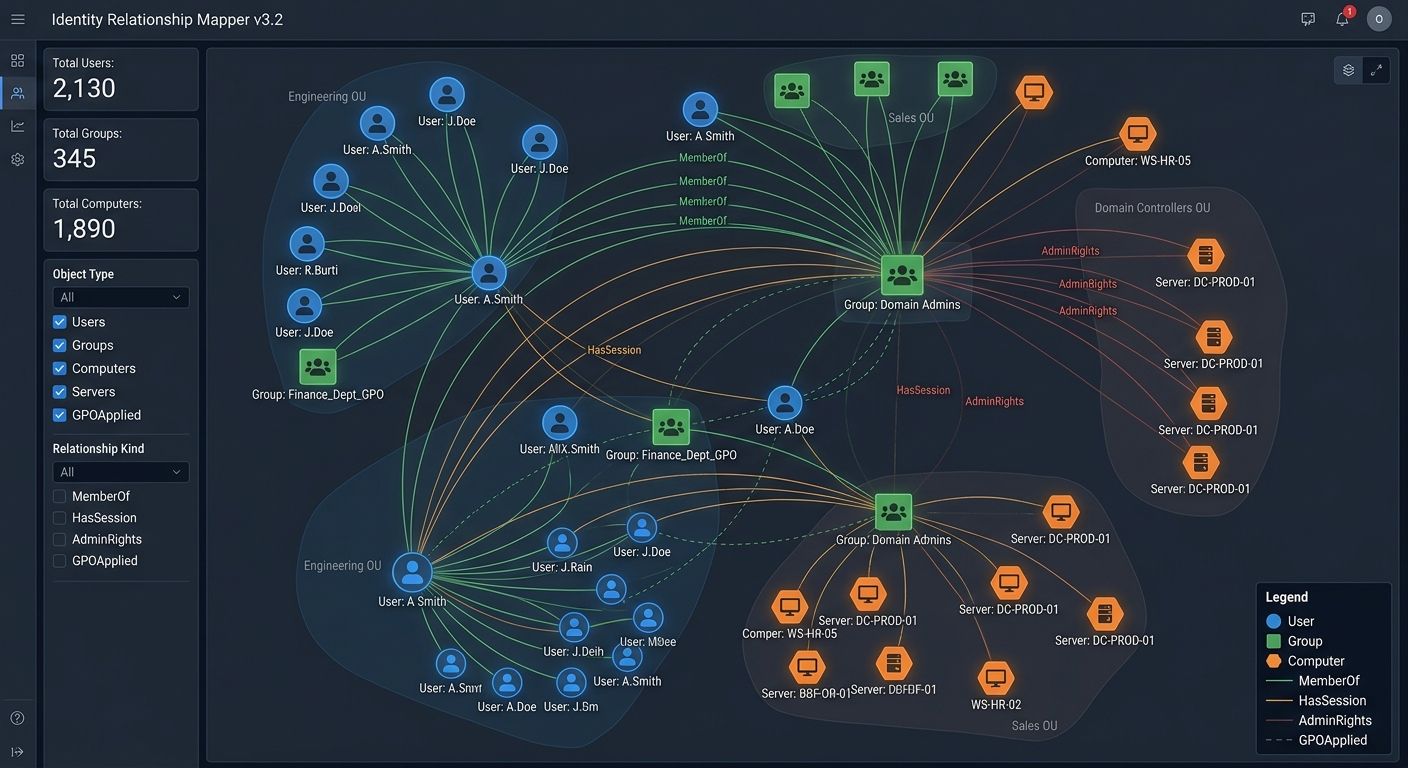
BloodHound addresses this visibility problem by representing identity relationships as a graph. Instead of looking at one permission at a time, security teams can see how users, groups, computers, and privileged resources are connected. This makes it easier to identify unnecessary access and relationships that deserve further investigation.
A simplified Active Directory relationship can look like this:
User
  |
  +---- MemberOf ----> Group
                         |
                         +---- AdminAccess ----> Computer
                                                    |
                                                    +---- Privileged Resource
The important security question is not simply whether a user has access to a particular resource. It is why that access exists and what other relationships it creates.
BloodHound Community Edition uses graph theory to expose hidden and unintended relationships in Active Directory and Entra ID. The same visibility can be used by defensive teams to understand privilege relationships and reduce unnecessary exposure.
Why Does Active Directory Need Relationship-Based Analysis?
Traditional permission reviews can become difficult in large environments. An administrator might verify that a user belongs to a particular group and conclude that the configuration looks correct. However, that group could inherit permissions from another group, which could have administrative access to a computer or another sensitive resource.
The resulting relationship can look like this:
User
 |
 v
Group A
 |
 v
Group B
 |
 v
Computer
 |
 v
Privileged Account
Each individual relationship may have been created for a legitimate reason. The combination can still create unnecessary security exposure.
This is why identity security requires more than checking individual accounts. Security teams need to understand relationships, privilege inheritance, administrative access, and the overall structure of the environment. BloodHound makes this type of analysis easier by placing those relationships into a searchable graph. For organizations with complex Active Directory environments, this can significantly improve visibility during security reviews.
How Does BloodHound Map Identity Relationships?
BloodHound works with collected identity and directory information and turns that information into relationships that can be explored. The current BloodHound Community Edition documentation supports collecting Active Directory information with SharpHound CE, while other collectors can be used for environments such as Entra ID and supported SaaS platforms.
The general workflow looks like this:
Active Directory
       |
       v
Data Collection (e.g., SharpHound)
       |
       v
BloodHound CE (graph database + UI)
       |
       v
Security Analysis
The resulting graph can contain relationships involving:
- Users
- Groups
- Computers
- Domains
- Sessions
- Permissions
- Trusts
- Administrative Relationships
This provides security professionals with a much broader view than a traditional list of users or groups. For example, instead of asking:
"Who is a member of this group?"
an analyst can investigate:
"What security relationships connect this identity to privileged resources?"
That change in perspective is one of BloodHound's biggest advantages.
What Security Risks Can BloodHound Reveal?
BloodHound can help security teams investigate several categories of identity risk.
One common example is excessive privilege:
Standard User
      |
      v
Department Group
      |
      v
Privileged Group
      |
      v
Administrative Computer
If the original user does not need access to the privileged group, the relationship should be investigated.
Another example is unnecessary administrative access:
Helpdesk Account
      |
      +---- Administrative Access ----> Server
The relationship might be completely legitimate. However, security teams should verify that it is required for the employee's role.
BloodHound can also help investigate:
- Excessive group memberships
- Privileged accounts
- Administrative relationships
- Domain trusts
- Active sessions
- Delegated permissions
- Unexpected identity relationships
- Potential privilege paths
The objective is not simply to identify as many paths as possible. The objective is to determine which relationships represent legitimate business requirements and which should be removed or restricted.
How Do You Install BloodHound Community Edition?
Prerequisites
Before installing BloodHound CE, ensure you have:
- A machine (VM or server) with:
- At least 8 GB RAM and 4 CPU cores (minimum recommended for small labs)
- Docker and Docker Compose v2.22+ installed
- Network access to:
- Your Active Directory domain (for data collection)
- The BloodHound web UI (typically port 8080)
On a typical Linux host (e.g., Ubuntu/Debian):
sudo apt update
sudo apt install -y docker.io docker-compose-v2
sudo systemctl enable docker
sudo systemctl start docker
Verify:
docker --version
docker compose version
Installing BloodHound CE
There are two common approaches:
Option 1: Quick single-command install (recommended for labs)
From the SpecterOps quickstart, you can pull and start BloodHound CE with one command:
curl -L https://ghst.ly/getbhce | docker compose -f - up -d
This downloads the official Docker Compose file and starts the containers (web UI, API, and graph database).
Once running, open:
http://localhost:8080
in your browser.
Option 2: Persistent install with custom config
For a more controlled setup:
mkdir -p /opt/bhce
cd /opt/bhce

curl -L https://ghst.ly/getbhce -o docker-compose.yml
docker compose pull
docker compose up -d
You can then edit docker-compose.yml or create a .env file to adjust settings such as the bind address, ports, or resource limits.
If you need external access (e.g., from other machines on your lab network), set:
echo "BLOODHOUND_HOST=0.0.0.0" > .env
docker compose down
docker compose up -d
This exposes the UI beyond localhost.
Initial Login and First Steps
When you first open http://<your-bh-host>:8080:
- Create an admin account (username, password, organization name).
- Log in with those credentials.
- You'll see the BloodHound CE dashboard with options to:
- Upload data (JSON from collectors)
- Explore the graph
- Run queries and pathfinding
At this point, BloodHound is installed and ready to receive directory data.
How Do You Collect Active Directory Data for BloodHound?
BloodHound itself does not scan Active Directory directly. You use a collector to gather data and then import it.
Using SharpHound (Windows)
For Active Directory, the primary collector is SharpHound (part of the BloodHound ecosystem).
On a Windows machine joined to the domain (ideally a admin workstation or jump host):
- Download the latest SharpHound release from the official SpecterOps GitHub repository.
- Run SharpHound with appropriate options, for example:
SharpHound.exe -c All -d yourdomain.local -z output.zip
Common flags:
-c All– collect all supported data types-d yourdomain.local– target domain-z output.zip– output file
- Upload
output.zipinto BloodHound CE via the web UI ("Upload Data" or similar).
SharpHound will enumerate users, groups, computers, sessions, ACLs, trusts, and more, then package them for import.
Alternative Collectors
For non-Windows or hybrid environments, other collectors (e.g., bloodhound.py, cloud-specific collectors) can be used depending on your environment and BloodHound version. The key idea remains: collector → JSON/ZIP → BloodHound import.
How Should BloodHound Be Used During a Security Audit?
BloodHound is most useful when it becomes part of a structured security-review process.
A defensive assessment can follow a workflow such as:
- Define the authorized environment
- Collect directory information (with SharpHound or other collectors)
- Import the data into BloodHound CE
- Review privileged relationships
- Investigate suspicious paths
- Validate business requirements
- Remediate unnecessary access
- Reassess the environment
The process should always begin with authorization. For example, a security team working on an internal Active Directory environment could document the scope as:
Assessment Scope:
Domain: lab.example.local
Environment: Internal Security Lab
Purpose: Identity Security Review
Authorization: Approved
After collecting information, the analyst can investigate a specific user in BloodHound:
- Use the search bar:
user:example-user
- Click the node to see:
- Group memberships
- Administrative rights
- Sessions
- Paths to high-value targets (e.g., Domain Admin, critical servers)
BloodHound CE provides an Explore interface where users and other nodes can be inspected and relationships can be analyzed. Its official quickstart also demonstrates pathfinding between identities in a controlled sample environment.
A security analyst can then document findings in a consistent format:
Finding:
Excessive Privilege Relationship

Risk:
High

Affected Identity:
example-user

Recommended Action:
Review inherited group membership

Status:
Requires Review
This creates an important distinction between security analysis and exploitation. The purpose of a defensive assessment is to discover unnecessary access and provide a clear path toward remediation.
How Can You Build a Safe BloodHound Learning Lab?
BloodHound is particularly useful for cybersecurity education because identity relationships can be explored in an isolated laboratory environment.
A simple lab might contain:
Windows Server
     |
     +-- Domain Controller
     |
     +-- Test Users
     |
     +-- Test Groups
     |
     +-- Test Workstations
The environment can then be populated with intentionally created accounts and permissions.
A safe architecture could look like:
              Security Lab
                   |
        +----------+----------+
        |                     |
   Active Directory       Test Systems
        |                     |
        +----------+----------+
                   |
              BloodHound CE
The official BloodHound Community Edition quickstart provides sample Active Directory data that can be imported without requiring you to analyze a real organization's directory.
A containerized local deployment can also be managed with Docker Compose:
docker compose up -d
When the lab is no longer required:
docker compose down
The official documentation recommends appropriate system resources for BloodHound CE, with 8 GB of RAM and four processor cores listed as minimum specifications for the documented setup.
Once the application is running, sample data can be uploaded through the interface:
BloodHound CE
      |
      v
Quick Upload
      |
      v
Sample Dataset
      |
      v
Explore
From there, students and security professionals can safely learn how identity relationships work without interacting with systems they do not own or administer.
Is BloodHound Useful for Defensive Security Teams?
Yes. BloodHound can provide a valuable additional layer of visibility for organizations managing Active Directory or hybrid identity environments.
The most important benefit is not the graph itself. It is the ability to turn complicated identity relationships into information that security teams can investigate and act upon.
A mature security workflow can look like:
Discover
   ↓
Analyze
   ↓
Prioritize
   ↓
Remediate
   ↓
Verify
   ↓
Repeat
For example, an organization might discover that an employee has inherited unnecessary privileges through several nested groups. Instead of treating that discovery as an isolated technical issue, the security team can investigate why the membership exists, confirm the business requirement, remove unnecessary access, and then verify the result.
This supports the principle of least privilege. It also helps organizations understand that identity security is not static. Employees change roles. Groups evolve. New servers are deployed. Legacy permissions remain. Service accounts are created. Administrative responsibilities change.
Over time, these changes can create relationships that were never intentionally designed as part of the organization's security architecture. BloodHound provides a practical way to make those relationships visible.
Is BloodHound a Hacking Tool?
BloodHound is a security analysis platform that can be used by both offensive and defensive security professionals. For defenders, its value comes from identifying complex privilege relationships and helping security teams understand and reduce unnecessary access.
Can BloodHound Be Used in a Cybersecurity Lab?
Yes. An isolated Active Directory laboratory is an appropriate environment for learning BloodHound. Using sample or intentionally created identities allows students to understand graph-based identity analysis without affecting real production systems.
What Are the Minimum System Requirements for BloodHound CE?
The official documentation recommends appropriate system resources for BloodHound CE, with 8 GB of RAM and four processor cores listed as minimum specifications for the documented setup.
Which Data Collectors Work with BloodHound?
For Active Directory, SharpHound is the primary collector. For other environments, additional collectors (such as bloodhound.py or cloud-specific tools) can be used depending on your setup and BloodHound version.
How Do You Import Data into BloodHound?
After running a collector (e.g., SharpHound), you get a ZIP or JSON file. In the BloodHound web UI, use the "Upload Data" feature to import that file. Once imported, the data appears as nodes and edges in the graph for analysis.
What Types of Relationships Does BloodHound Show?
BloodHound can show relationships involving users, groups, computers, domains, sessions, permissions, trusts, and administrative relationships. This provides a broader view than a traditional list of users or groups.
Final Thoughts
Active Directory security is fundamentally about controlling relationships between identities and resources. A single permission might appear harmless, but several connected permissions can create unexpected privilege paths.
BloodHound helps make those relationships visible. For security teams, this means better visibility into privileged accounts, group memberships, administrative access, sessions, trusts, and other identity relationships.
Used responsibly, BloodHound can become an important part of an Active Directory security-audit workflow.
The goal should always be straightforward:
Find unnecessary access
          ↓
Understand why it exists
          ↓
Remove or restrict it
          ↓
Verify the improvement
For organizations beginning an identity-security review, BloodHound provides a useful starting point for understanding where privilege exists and how different parts of an environment are connected. Start with an authorized lab, learn how identity relationships are represented, and then apply the same security principles to environments you are responsible for protecting.
For a deeper dive into Windows environments, see our Active Zero-Day Alert and EternalBlue Exploit Analysis – Runbook .