
Back to Resources
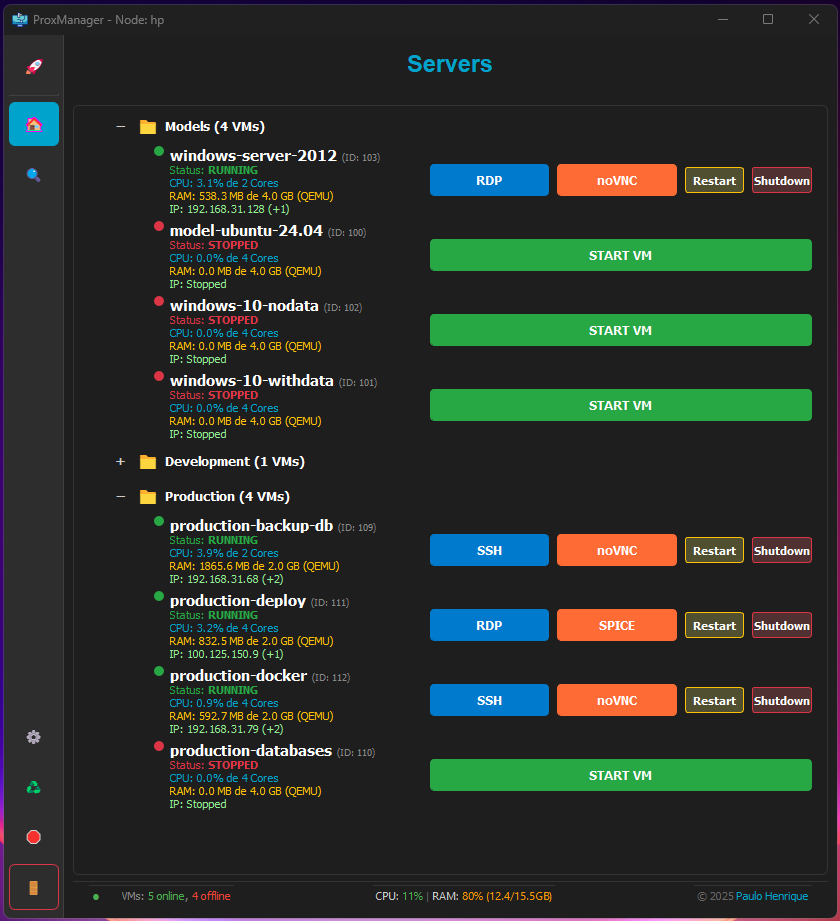
ProxManager - Proxmox VM Manager — Programming tool screenshot
Programming

ProxManager - Proxmox VM Manager

A native desktop application built with Python and PyQt5 for quick monitoring and management of virtual machines (VMs) hosted on a Proxmox node. It's designed for users who need an instant view of server metrics and operational control over their VMs without having to access the full web interface.

TO-DO List and Future Improvements

🟡 PENDING

Testing on Linux Environments

The application was primarily developed and tested on Windows.

Full compatibility across Linux distributions still needs to be verified and ensured.

Asynchronous Action Indicators

Add visual feedback (like a spinner) to buttons when executing VM actions (Start, Stop, Reboot) to improve the user experience.

Get ticket for noVNC Get the ticket for noVNC, allowing you to access the VM via noVNC without having to log in to the Proxmox webui first

🟢 COMPLETED

Tab for open VMs Add a vertical tab (like in VMware Workstation) allowing you to bring the SSH, SPICE, openVNC, or RDP process to the foreground

VNC Support for Linux Machines

Remote viewing functionality is currently focused on the Windows environment.

The logic for opening VNC connections needs to be adapted for Linux VMs.

RDP Support for Windows Machines

Remote viewing functionality is currently focused on the Windows environment.

Folders Organization

Add folders to place servers within them, which will make organization easier

Configuration Screen

On the settings screen, options will be added to define whether Spice will open in full screen and whether auto resize will start checked or not.

VM Metrics Refactoring

Added display of RAM usage in MB (used) vs. GB (total allocated) per VM.

Formatting Error Fix

Fixed NoneType and Unknown format code errors during application startup and Node metrics display.

Footer Layout Improvement

Implemented a two-line footer with a horizontal separator and centered copyright.

🚀 Features

Main Dashboard

Node Overview: Displays the current CPU usage, RAM usage, and Load Average of the Proxmox node.

Status Count: Shows the total number of Online and Offline VMs.

Persistence: Automatically saves the size and position of the main window.

VM Management

Dynamic List: Displays all VMs on the node, sorted by status (Running first) and name.

Detailed VM Metrics: Displays the current CPU usage (in %) and RAM usage (in MB used vs. total GB allocated) for each VM.

Quick Actions:

Start/Shutdown: Power on and shut down the VM.

Restart: Reboots the VM.

SPICE: Initiates the SPICE remote connection for the VM console.

VNC: Initiates the VNC remote connection for the VM console.

🛠️ Installation and Requirements

This project requires Python 3.x and the PyQt5 library, along with the Proxmox API library (proxmoxer).

Dependencies

python -m venv venv

pip install -r requirements.txt

vv1.0.4 33.5 MB 0 downloads
Tags
ProxManagerProxmoxVM Manager