
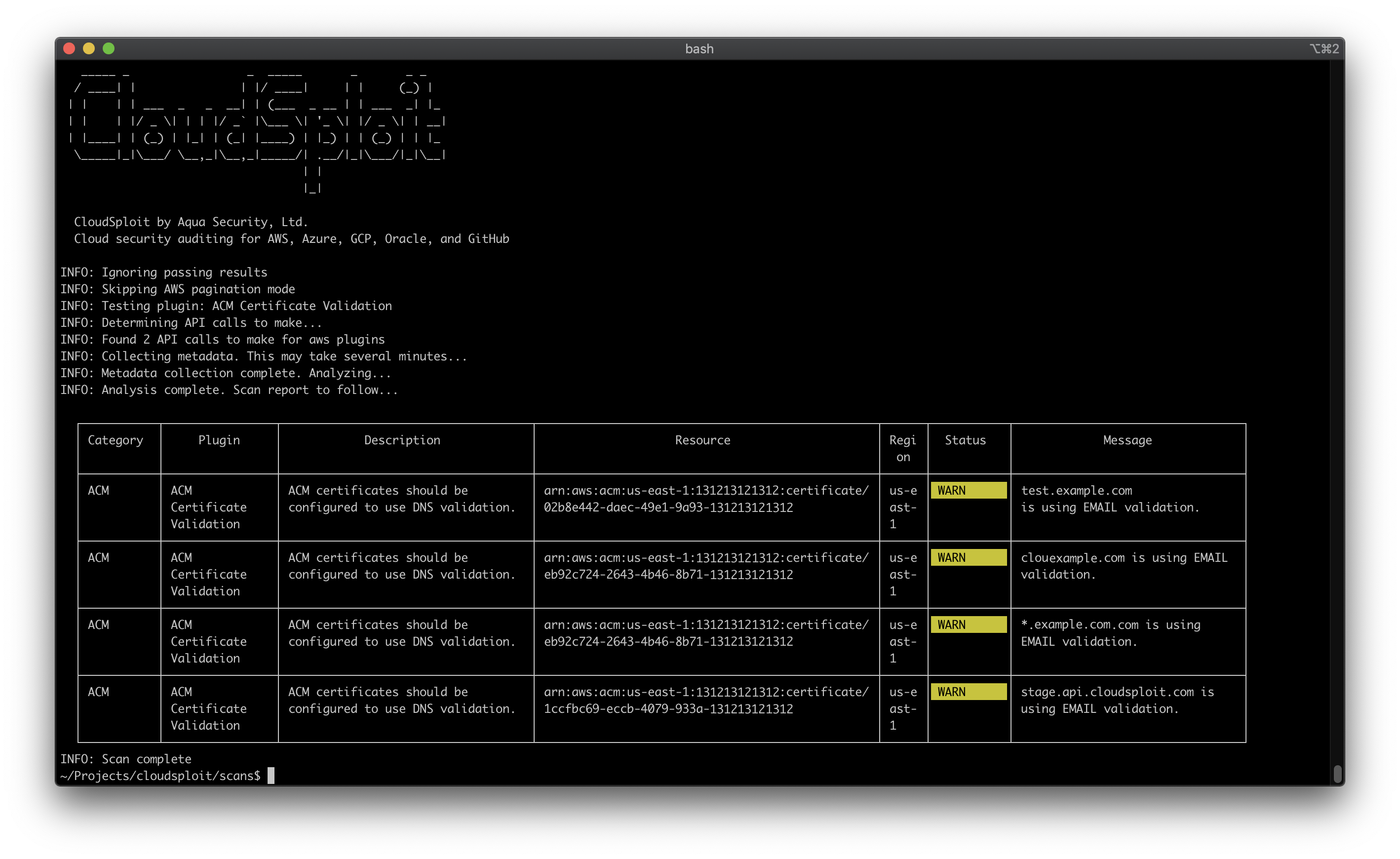
CloudSploit Cloud Security
CloudSploit, developed by Aqua, is a cloud security solution designed to enhance the security posture of cloud environments. It provides comprehensive monitoring and assessment tools that help organizations identify vulnerabilities and misconfigurations across various cloud platforms. By leveraging automated scanning and continuous monitoring, CloudSploit enables users to maintain compliance and safeguard their cloud resources effectively.
CloudSploit by Aqua is an open-source project designed to allow detection of security risks in cloud infrastructure accounts, including: Amazon Web Services (AWS), Microsoft Azure, Google Cloud Platform (GCP), Oracle Cloud Infrastructure (OCI), and GitHub. These scripts are designed to return a series of potential misconfigurations and security risks.
Deployment Options
CloudSploit is available in two deployment options:
Self-Hosted
Follow the instructions below to deploy the open-source version of CloudSploit on your machine in just a few simple steps.
Hosted at Aqua Wave
A commercial version of CloudSploit hosted at Aqua Wave. Try Aqua Wave today!
Installation
Ensure that NodeJS is installed. If not, install it from here.
$ git clone [email protected]:cloudsploit/scans.git
$ npm install
Configuration
CloudSploit requires read-only permission to your cloud account. Follow the guides below to provision this access:
Amazon Web Services
Microsoft Azure
Google Cloud Platform
Oracle Cloud Infrastructure
For AWS, you can run CloudSploit directly and it will detect credentials using the default AWS credential chain.
CloudSploit Config File
The CloudSploit config file allows you to pass cloud provider credentials by:
A JSON file on your file system
Environment variables
Hard-coding (not recommended)
Start by copying the example config file:
$ cp config_example.js config.js
Edit the config file by uncommenting the relevant sections for the cloud provider you are testing. Each cloud has both a credential_file option, as well as inline options. For example:
azure: {
// OPTION 1: If using a credential JSON file, enter the path below
// credential_file: '/path/to/file.json',
// OPTION 2: If using hard-coded credentials, enter them below
// application_id: process.env.AZURE_APPLICATION_ID || '',
// key_value: process.env.AZURE_KEY_VALUE || '',
// directory_id: process.env.AZURE_DIRECTORY_ID || '',
// subscription_id: process.env.AZURE_SUBSCRIPTION_ID || ''
}
Credential Files
If you use the credential_file option, point to a file in your file system that follows the correct format for the cloud you are using.
AWS
{
"accessKeyId": "YOURACCESSKEY",
"secretAccessKey": "YOURSECRETKEY"
}
Azure
{
"ApplicationID": "YOURAZUREAPPLICATIONID",
"KeyValue": "YOURAZUREKEYVALUE",
"DirectoryID": "YOURAZUREDIRECTORYID",
"SubscriptionID": "YOURAZURESUBSCRIPTIONID"
}
GCP
Note: For GCP, you generate a JSON file directly from the GCP console, which you should not edit.
{
"type": "service_account",
"project": "GCPPROJECTNAME",
"client_email": "GCPCLIENTEMAIL",
"private_key": "GCPPRIVATEKEY"
}
Oracle OCI
{
"tenancyId": "YOURORACLETENANCYID",
"compartmentId": "YOURORACLECOMPARTMENTID",
"userId": "YOURORACLEUSERID",
"keyFingerprint": "YOURORACLEKEYFINGERPRINT",
"keyValue": "YOURORACLEKEYVALUE",
}
Environment Variables
CloudSploit supports passing environment variables, but you must first uncomment the section of your config.js file relevant to the cloud provider being scanned.
You can then pass the variables listed in each section. For example, for AWS:
{
access_key: process.env.AWS_ACCESS_KEY_ID || '',
secret_access_key: process.env.AWS_SECRET_ACCESS_KEY || '',
session_token: process.env.AWS_SESSION_TOKEN || '',
}
Running
To run a standard scan, showing all outputs and results, simply run:
$ ./index.js
CLI Options
CloudSploit supports many options to customize the run time. Some popular options include:
AWS GovCloud support: --govcloud
AWS China support: --china
Save the raw cloud provider response data: --collection=file.json
Ignore passing (OK) results: --ignore-ok
Exit with a non-zero code if non-passing results are found: --exit-code
This is a good option for CI/CD systems
Change the output from a table to raw text: --console=text
See Output Formats below for more output options.
Click for a full list of options
$ ./index.js -h
_____ _____ _
/ ____| | | |/ ____| | | (_) |
| | | | ___ __| | (___ _ __ | | ___ | |
| | | |/ \| | | |/ ` |\___ \| ' \| |/ \| | __|
| |____| | () | || | (_| |____) | |) | | () | | |_
\_____|_|\___/ \__,_|\__,_|_____/| .__/|_|\___/|_|\__|
| |
|_|
CloudSploit by Aqua Security, Ltd.
Cloud security auditing for AWS, Azure, GCP, Oracle, and GitHub
usage: index.js [-h] --config CONFIG [--compliance {hipaa,cis,cis1,cis2,pci}] [--plugin PLUGIN] [--govcloud] [--china] [--csv CSV] [--json JSON] [--junit JUNIT]
[--table] [--console {none,text,table}] [--collection COLLECTION] [--ignore-ok] [--exit-code] [--skip-paginate] [--suppress SUPPRESS]
optional arguments:
-h, --help show this help message and exit
--config CONFIG
The path to a cloud provider credentials file.
--compliance {hipaa,cis,cis1,cis2,pci}
Compliance mode. Only return results applicable to the selected program.
--plugin PLUGIN A specific plugin to run. If none provided, all plugins will be run. Obtain from the exports.js file. E.g. acmValidation
--govcloud AWS only. Enables GovCloud mode.
--china AWS only. Enables AWS China mode.
--csv CSV Output: CSV file
--json JSON Output: JSON file
--junit JUNIT Output: Junit file
--table Output: table
--console {none,text,table}
Console output format. Default: table
--collection COLLECTION
Output: full collection JSON as file
--ignore-ok Ignore passing (OK) results
--exit-code Exits with a non-zero status code if non-passing results are found
--skip-paginate AWS only. Skips pagination (for debugging).
--suppress SUPPRESS Suppress results matching the provided Regex. Format: pluginId:region:resourceId
