
Understanding these layers is important not only for developers, but also for analyzing potential security risks.
1. Linux Kernel, The Foundation Layer.
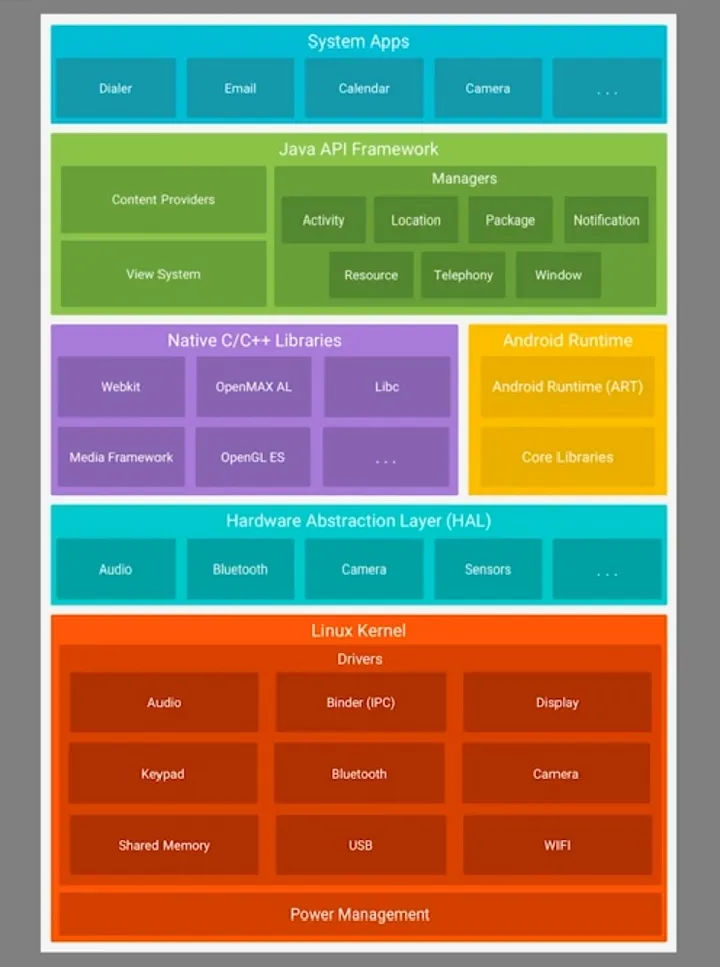
The Linux Kernel is the lowest and most important layer of Android. It acts as a bridge between software and physical hardware.
It contains components such as audio drivers, display drivers, camera drivers, Bluetooth, USB, Wi-Fi, keypad drivers, Binder IPC for communication between processes, shared memory, and power management.
The kernel manages system processes, memory, power consumption, networking, and file systems. It also activates hardware through the appropriate driver.
Without the kernel, the system cannot access the camera, screen, battery, network, or any other physical parts of the device.
2. Hardware Abstraction Layer (HAL)
The Hardware Abstraction Layer sits right above the Kernel. HAL provides a set of modules that allow Android to communicate with hardware without needing to understand the hardware details.
For example, there are HAL modules for audio, Bluetooth, camera, and sensors.
Because HAL abstracts the hardware, Android can run on many different smartphone brands and chipsets.
3. Native C/C++ Libraries and Android Runtime
This layer contains two working parts:
- Native C/C++ Libraries. These are powerful libraries that perform heavy tasks such as multimedia processing, web rendering, and graphics. Examples include WebKit (web browsing), Media Framework (audio and video), OpenGL ES (graphics), libc (system functions), SQLite (database), and OpenMAX AL (multimedia). These libraries are used by higher-level components and apps to perform demanding or low-level operations.
- Android Runtime (ART). ART is the environment where Android apps run. It converts the app’s bytecode into machine code, optimizes performance, manages memory using garbage collection, and provides core Java/Kotlin libraries that apps rely on. Without ART, Android applications would not be able to execute.
4. Java API Framework
This layer provides services and APIs for developers. It allows apps to interact with system features without touching lower layers like HAL or the kernel.
Some of the important components here are the Activity manager, Content Providers, Resource Manager, View System, Location Manager, Telephony Manager, Window Manager, Notification Manager, and Package Manager.
This layer controls app lifecycle, user interface, user interactions, notifications, permissions, location access, and many other behaviors.
The app lifecycle is the process of what happens to an Android app from the moment you open it until it closes.
5. System Apps, The Top Layer
The topmost layer contains system applications such as Phone Dialer, Email, Calendar, Camera, and others. These apps offer ready to use features for the user and also showcase how to use the API Framework properly.
Third-party applications installed from the Play Store also operate at this layer.
How All Layers Work Together
When an app takes a photo, the process moves through the layers step by step:
1. The app requests camera access through the API Framework.
2. The Framework passes the request to the Camera HAL.
3. HAL communicates with the camera driver in the Kernel.
4. The driver triggers the physical camera sensor to capture the photo.
5. The output is returned back up the layers to the app.
Every layer plays a role, and each must work correctly for the system to function normally.
Security Vulnerabilities Based on Android Architecture Layers
Each layer of Android has its own security risks. The lower the layer, the higher the impact if it is compromised.
1. Vulnerabilities in the Linux Kernel
The kernel is the most critical layer. If it is exploited, attackers can gain full control of the device.
Common risks include privilege escalation (gaining root access), buffer overflow in drivers, Wi-Fi or Bluetooth bugs, root exploits, and spying on Binder IPC.
If the kernel is compromised, attackers can read all app data, bypass security sandboxing, survive factory reset, and access camera, microphone, GPS, and sensors without permission.
2. Vulnerabilities in the HAL
Because HAL modules are developed by different hardware vendors, security quality varies greatly.
Typical problems include missing input validation, unchecked permission access to hardware, memory corruption crashes, and exploitation of Bluetooth or camera components.
As a result, attackers may activate the microphone anonymously, track location without permission, or gather sensor data to profile the user.
3. Vulnerabilities in Native Libraries and Android Runtime
Since these libraries use C/C++, memory issues are common. Frequent vulnerabilties include remote code execution, memory corruption, SSL/TLS flaws, WebKit exploits, and bugs in Media Framework.
Attackers may run malicious code by tricking users into opening a file, watching a video, or visiting a webpage, often without any user interaction.
4. Vulnerabilities in the Java API Framework
If permission handling or app communication is misconfigured, one app can attack another.
Typical attacks include intent hijacking, insecure broadcast receivers, exposed Content Providers, permission abuse, and reflection exploitation.
The results can include unauthorized reading of app data, silent sending of SMS, fake notifications, or forced execution of system functions.
5. Vulnerabilities in System Apps and Third-Party Apps
This is the most targeted layer because it interacts directly with the user.
Common developer mistakes include storing passwords or API keys in the APK, saving sensitive data without encryption, sending data through HTTP, insecure WebView usage, enabling backup access, and using outdated libraries.
Attackers may steal user data, take over accounts, or create malware disguised as normal applications.