

The target can be a website, server, company, or even an individual. The main purpose of information gathering is to understand how the target works and what technologies it uses.
By performing information gathering, security analysts can map the target’s digital environment, identify possible weaknesses, and avoid unnecessary risks during later testing stages.
Purpose of Information Gathering
The main goal of information gathering is to build a clear picture of the target. This includes:
- Identifying servers and network infrastructure
- Knowing the technologies and software in use
- Understanding who manages or owns the system
- Finding potential entry points that could become security risks
This step helps ensure that security testing is focused, effective, and well-planned.
Types of Information Gathering
There are two main approaches used in information gathering:
1. Passive Information Gathering
Passive information gathering involves collecting data without directly interacting with the target system. All information is obtained from public or third-party sources. Because no direct contact is made, the target is usually unaware of the activity. This approach is safe and quiet, making it ideal for early stage reconnaissance.
2. Active Information Gathering
Active information gathering requires direct interaction with the target system. In this method, requests are sent to the target, and responses are analyzed. While active techniques provide more detailed technical information, they must be used carefully to avoid triggering security alerts.
Common Tools Used in Information Gathering
Several tools are commonly used to support both passive and active information gathering. Here are the tools in practice:
Cloudflare IPs are not the real server IPs. They belong to Cloudflare and are used to protect and hide the actual server, for example: 104.21.45.132, 172.67.190.88, and 188.114.96.7.
The origin IP is the real IP address of the server, usually from a VPS or cloud provider, such as 103.130.18.45 (Indonesia VPS), 159.223.67.91 (DigitalOcean), 45.77.123.10 (Vultr), and 18.140.22.11 (AWS).
1. Nmap
Nmap is a powerful tool used for scanning open ports and identifying running services on a target system. An open port indicates that a service is active and may require further security testing.
nmap example.com
2. WHOIS
WHOIS (Who Owns It) as the name suggest, is used to obtain domain registration details. It can reveal information such as the domain owner, registration dates, expiration dates, and technical contact details. This helps identify who is responsible for managing the website and its hosting environment.
whois example.com
3. Nslookup
Nslookup (Name Server Lookup) is used to find information about a domain name or an IP address. Its main purpose is to translate domain names into IP addresses and vice versa.
nslookup example.com
4. Dig
Dig sends a DNS query and displays the full response from the DNS server. This includes technical details such as response time, record types, and DNS flags. Unlike nslookup, dig shows exactly how the DNS server answers the request.
dig example.com
5. Subfinder
Subfinder is used to discover subdomains associated with a main domain. Subdomains are often overlooked and can expose additional services.
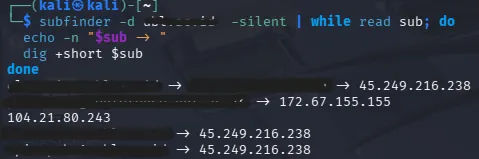
Here is an example of a script used to display all of the subdomains of a certain domain along with the addresses.
subfinder -d example.com -silent | while read sub; do
  echo -n "$sub -> "
  dig +short $sub
done
- -d means domain.
- -silent means removes extra output so only the subdomain names are shown.
- | (pipe) means send the output of subfinder to the next command instead of showing it on the screen.
- while is used to start a loop.
- read sub is used to read one line of input at a time and stores it in a variable called sub.
- do is used to Marks the beginning of the commands that will run for each line.
- echo is used to print text to a the terminal
- -n is used to prevent a new line from being added after printing.
- “$sub” is used to print the subdomain that is stored in the variable sub.
- dig is used to find the IP addresses of all subdomain that is stored in the variable sub.
- +short is used to shorten the details. Only IP addresses, without extra DNS details.
- and then the $sub is used to call the subdomain and use them as the target for the dig command.
- done ends the while loop.
In summary, What this script does is:
- Finds all subdomains of example.com
- Takes each subdomain one by one
- Looks up its IP address
- Prints the subdomain and its IP on the same line