

What Is Port Scanning and How It Works
Introduction
After identifying active hosts through network mapping, the next step is port scanning. Port scanning aims to determine which network services are running on each host.
Each network service listens on a specific port. If a port is open, it indicates that a service is actively waiting for connections. These open ports define the system’s attack surface.
Concept of Ports and Services
1. Port
A port is a number used by a computer to decide where network data should go. When data arrives at a computer from the internet or a local network, the computer needs to know which application should receive that data. The port number provides that information.
Every port is identified by a number between 0 and 65535.
- If a port is open, it means the computer is listening for incoming connections on that port.
- If a port is closed, no application is using it.
Ports work together with IP addresses. An IP address identifies the computer, while a port identifies the application on that computer.
2. Service
A service is a program or application that runs on a computer and provides a function over a network.
A service listens on a specific port and waits for incoming requests. When a request arrives, the service processes it and sends a response back.
For example:
- A web service listens on port 80 or 443
- An SSH service listens on port 22
- A database service may listen on port 3306
Services are what actually do the work. The port is only the entry point.
3. TCP (Transmission Control Protocol)
TCP is a reliable protocol because it establishes connections using a mechanism called the three-way handshake. The three-way handshake consists of three steps:
- First, the client sends a SYN packet to the server to request a connection.
- Second, if the port is open, the server responds with a SYN-ACK packet.
- Third, the client sends an ACK packet to confirm the connection, and the TCP session is established.
If a port is closed, the server typically responds with an RST (Reset) packet.
If a port is filtered, there is usually no response at all.
During port scanning, Nmap analyzes how a target responds to parts of the TCP handshake.
- In a TCP Connect Scan, Nmap completes the entire three-way handshake, creating a full TCP connection. This method is reliable but slow and easy to detect.
- In a SYN Scan (-sS), Nmap sends only the SYN packet. If it receives a SYN-ACK, the port is considered open, and Nmap immediately sends an RST packet to terminate the connection before the handshake is completed. This makes the scan faster and less noticeable, which is why it is often called a stealth scan.
Nmap Port Scanning Commands
Basic Port Scan
The simplest form of port scanning with Nmap is performed using the following command:
sudo nmap ipaddr/domainname
This command scans the 1,000 most common TCP ports. Nmap sends TCP probes and analyzes the responses to determine whether a port is open, closed, or filtered.
Even without additional options, this scan provides a useful overview of exposed services.
Without administrative privileges, Nmap is limited to TCP connect scans, which are slower and easier to detect. When run with sudo, Nmap can send raw packets, enabling faster, stealthier scans, including SYN scans and OS detection.
Service Version Detection
To identify the specific software and version running on an open port, the following command is used:
sudo nmap -sV ipaddr/domainname
The -sV option instructs Nmap to interact more deeply with detected services. Nmap sends service-specific requests and analyzes the responses or banners to identify application names and versions.
Version information is crucial because many vulnerabilities are tied to specific software versions.
Operating System Detection
Nmap can also estimate the operating system of the target host.
sudo nmap -O ipaddr/domainname
This option works by analyzing subtle differences in TCP/IP behavior. While not always perfectly accurate, OS detection helps with system profiling and attack planning.
Aggressive Scan
To combine multiple scanning techniques into a single command, Nmap provides the aggressive scan option.
sudo nmap -A ipaddr/domainname
The -A option enables OS detection, service version detection, script scanning, and traceroute. While very informative, this scan is also noisy and easily detected by intrusion detection systems.
Scanning All Ports
By default, Nmap does not scan every port. To scan all 65,535 TCP ports, use:
sudo nmap -p- ipaddr/domainname
This scan takes significantly longer but often reveals services running on non-standard ports.
Scanning Multiple Targets from a File
Hosts that have been discovered during network mapping can be scanned directly using a target list.
sudo nmap -oG - -sn ipaddr/domainname | grep Up > live_hosts.txt
sudo nmap -sV -iL live_hosts.txt
The -iL option allows Nmap to read target IP addresses from a file, making large-scale scans more efficient.
SYN Scan and Stealth Scanning
With administrative privileges, Nmap can perform SYN scans.
sudo nmap -sS ipaddr/domainname
A SYN scan sends only the initial TCP SYN packet and does not complete the handshake. This makes the scan faster and less noticeable compared to a full TCP connection scan.
Scanning Specific Ports
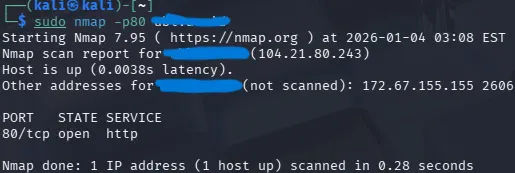
Sometimes, only specific services are of interest. For example, to scan only HTTP services:
sudo nmap -p80 ipaddr/domainname
This command scans only port 80, reducing scan time and focusing on relevant services.